I’m a solo developer working on an SAAS product, with servers & database hosted on AWS, and accessed by users via an iOS app. The servers interact with an external service provider in daily operation, which involves receiving and transmitting data through the external service provider. The user apps, when open and logged in, are continually updated through WebSocket connections with the server. In order to simplify server side storage of app state, when the server transmits content data to the apps, it incorporates datestamps from the external service provider that are specified to microsecond level precision, as strings within JSON structures (one microsecond == 1/1_000_000 second).
When then apps report their state within a given context back to the server, they report the most recent object in that context, and the server uses that datestamp to check if there is any newer information available within that context. If so, newer data is then sent to the app, and the app updates locally stored data & date reporting to reflect this. The app also uses these dates to sort entities in the view in a given context chronologically.
This mechanism has proven to be simple, fast and reliable – the only downside is that it presumes time events are added to the database in a strictly time-forward manner – ie, events will not be added to the database out of time order in the external service provider’s timestamps.
The problem
When writing timestamp handling code in my iOS app, I ran into problems trying to store microsecond level precision timestamps. The following Xcode Playground code illustrates the problem:
import Foundation

let date = Date()
print("\(date.formatted(date: .numeric, time: .standard))") // 06/10/2025, 12:24:47 PM
print("\(date.timeIntervalSinceReferenceDate)")  // 781406687.537743 (number of seconds since 00:00:00 UTC on 1 January 2001)

let df = DateFormatter()
df.timeZone = TimeZone(identifier: "Australia/Melbourne")
df.dateFormat = "yyyy-MM-dd'T'HH:mm:ss.SSSSSSZZZZZ" // Z*5 specifies ISO 8601 timezone format (ie: "+04:00", which has *6* characters!!!)

print("\(df.string(from: date))") // 2025-10-06T12:24:47.538000+11:00 => rounding has occurred!
So, Date appears to be capable of representing microsecond precision Date objects, but DateFormatter truncates microseconds to milliseconds when generating timestamp strings.
Let’s try using DateFormatter to create a Date object from a string, where the time is specified to microsecond level precision, to check if this microsecond truncation in DateFormatter runs both ways:
let date_2 = df.date(from: "2025-09-21T11:35:24.917859+10:00")!
print("\(date_2.timeIntervalSinceReferenceDate)")   // 780111324.917
print("\(df.string(from: date_2))")                 // 2025-09-21T11:35:24.917000+10:00
When creating the Date object, DateFormatter truncated the microsecond component. So, DateFormatter is no help to us when trying to store a datestamp to microsecond precision, or when trying to extract it as a string.
Let’s try using timeIntervalSinceReferenceDate directly:
let date_3 = Date()
print("\(date_3.timeIntervalSinceReferenceDate)")
    // 781408899.540829
let microseconds = 1e6*(date_3.timeIntervalSinceReferenceDate - floor(date_3.timeIntervalSinceReferenceDate))
print("\(microseconds)")
    // 540828.9432525635
So, we can extract the microsecond component by reading and operating on the .timeIntervalSinceReferenceDate attribute directly, although the calculated microseconds are off by approximately 1/20 of a microsecond.
Why is this happening?
Date’s internal implementation
This behavior is because of how timeIntervalSinceReferenceDate is stored internally. If we command-click on Date, we are shown the class’s signature in Foundation (line 9229), which reveals timeIntervalSinceReferenceDate to be of type TimeInterval. Another command-click hops us to Foundation/NSDate (line 7), where TimeInterval is revealed to be of type Double, which is a 64 bit float.
Let’s have a look at 64 bit floats, with some assistance from Wikipedia (https://en.wikipedia.org/wiki/IEEE_754):
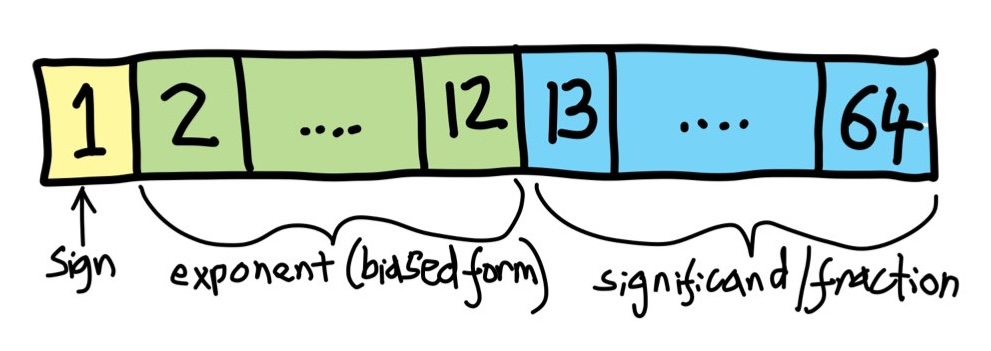
The first bit is the sign bit, the next 11 contain the exponent (in biased form), and the last 52 bits contain the significand, or fraction:

The equation above shows how to convert these three components into a number. We want to preserve as many significant digits of our number as possible, by representing the significand in the form 1.fraction – but if we can always represent our number in a form that has a leading 1 before the decimal point (known as a normalized form), then we can avoid needing to allocate a bit to represent the leading 1 and presume it instead.
This may be counterintuitive, but any real number can be expressed in a form that starts with a 1. … by dividing or multiplying by some appropriate power of 2.
The exponent is represented in a biased form for two reasons – the first is to ensure that floating point numbers can be compared (the <, == and > operators) using fixed point architecture in computer hardware and still obtain correct results, enabling much faster comparison operations. The second is to permit all 0s or all 1s in the exponent to be used to signal denormalized numbers, which require special handling.
For an 11 bit exponent, the bias is equal to 2^(11-1)-1 = 1023.
The biased exponent needs to have the bias subtracted in order to find the actual power of 2 by which we multiply the rest of the number.
The consequence of this is that the highest possible biased exponent is 0b 111 1111 1110 (== 2046). The minimum possible biased exponent is 0b 000 0000 0001, (== 1). Subtracting the bias then gives a minimum unbiased exponent of -1022 and a maximum unbiased exponent of 1023.
The largest normalized number we can represent is therefore 1.9999… * 2^(1023), and the smallest normalized number we can represent is 1.0 * 2^(-1022).
Another way to represent this is to express the number as shown in the diagram below:
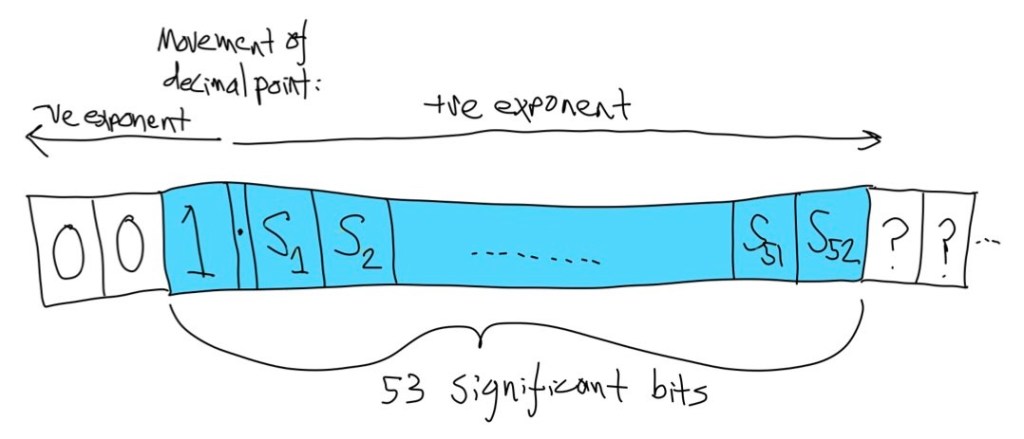
The implied leading 1 of the normalized form is followed by the 52 significant digits of the significand, and then the debiased exponent then tells us how many places to move the decimal point – to the right if a +ve exponent, or to the left if a -ve exponent. Moving the decimal point does not add extra bits of precision – it just changes the magnitude of the number by some integer power of 2.
Floating point is great for representing a wide range of magnitudes of number, and is capable of representing any integer with up to 53 binary digits exactly. For fractional components of a number, however, most numbers expressible in a finite number of decimal digits cannot be represented exactly. Some can – 0.5 is 1/2, 0.875 is 7/8 (== 1/2 + 1/4 + 1/8), but 0.1 is not precisely representable in binary, since it cannot be reduced to an exact combination of inverse powers of 2 – the nearest we can get is 0.0001 1001 1001 1001 1001 1001… The size of the error is dependent on the distance to the nearest fractional that can be represented by the floating point representation – so the more bits of precision we have, the smaller our error, but it never gets to zero.
A consequence of the use of exponents is that the maximum error increases with exponent increases. As an example, let’s compare 1024.1 and 1.1. They have the following representations:
1024.1: 0 10000001001 0000000000000110011001100110011001100110011001100110
1.1: 0 01111111111 0001100110011001100110011001100110011001100110011010
Each floating point binary representation has been grouped into sign bit, biased exponent and fractional. Inspection of the floating point representation for 1024.1 reveals a significant number of zeroes after the implied leading 1., since dividing 1024.1 by 1024 (2^10) has the effect of pushing the .1 component down the significant bits: 1.000 097 656… Looking at 1.1, it is already in normalized form, so the exponent is 0, after subtraction of the bias. So we have more bits available to represent the fractional component of the number, and the difference between 1.1 and the floating point representation of that number is smaller. Inspection of the fractional components of each number reveals that the non-zero digit sequences are the same, just shifted, which is what we expect when we multiply or divide a binary number by a power of 2.
The important idea here is that the larger the exponent of the floating point number, the greater the magnitude of the maximum possible error in numeric representation.
Date investigation
Returning to the representation of timeIntervalSinceReferenceDate, one of the downsides of Xcode Playgrounds is that they do not appear to allow single step debugging or memory inspection. To verify that IEEE 754 is indeed the internal representation used by Date, create a new app using the app template, and add the following inside ContentView:
let date: Date

init() {
    self.date = Date()
    print("date = \(date)")
}
Place a breakpoint at the print(…) statement inside the init() routine, and inspect the date variable in the debug window. Expand the object in the debug area until you see “_time” Right click on “date” and select “View Value As”, then choose between “Binary”, “Float” and “Hex” to see the raw data, floating point, or hexadecimal representations:

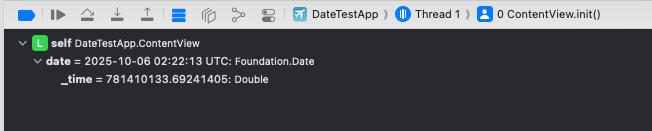

Inspection of these values will confirm that _time conforms to IEEE 754.
Creating an app to inspect internal variables is a bit clunky, so we’ll use the %a (64 bit floating point) format specifier to print timeIntervalSinceReferenceDate in a way that allows us to understand what the individual bits are doing:
let date_4 = Date()
print(String(format: "%a", date_4.timeIntervalSinceReferenceDate))
    // 0x1.74ba8635ac7ebp+29
This format specifier is pretty neat – it includes the implied leading bit of the significand, includes all 52 bits of the significand itself, and the debiased exponent – this is very handy indeed for understanding what is going on with the internal representation, without needing to run a full app in order to inspect a variable in memory. So, we can continue investigating Date using a Playground.
As an aside, DateFormatter is capable of converting date strings up to the end of the year 144,683 inclusive into Date objects. The reason for the limitation is not apparent, since the floating point number does not appear to have saturated:
let date_5: Date = df.date(from: "144683-12-31T23:59:59.999+10:00")!
//let date_5b: Date = df.date(from: "144684-01-01T00:00:00.000+10:00")! // chokes!
print("\(date_5)") // 144683-12-31 14:00:00 +0000
print(String(format: "%a", date_5.timeIntervalSinceReferenceDate)) // 0x1.0616925f77fffp+42
Given an exponent of 42, there are 10 bits left for the fractional component, which implies that it has resolution of 1/1024 of a second for the year 144,683. So, let’s test round trip accuracy for a value near the upper limit of the range, and see what happens to our milliseconds:
let date_6: Date = df.date(from: "141368-09-12T04:05:06.771+10:00")!
print(String(format: "%.12f", date_6.timeIntervalSinceReferenceDate))
    // 4398019697106.771484375000 - but 0.77099609375 would be the nearer approximation!!!
print(String(format: "%a", date_6.timeIntervalSinceReferenceDate))
    // 0x1.ffff336ce962cp+41
print("\(df.string(from: date_6))")
    // 141368-09-12T04:05:06.772000+10:00 - but .771 would still be the nearer approximation?!
So, Date combined with DateFormatter does not have even millisecond accuracy for round trip string-Date-string conversions over the full range of validity. It looks like there may be issues with the DateFormatter implementation.
When using .addingTimeInterval, Date is able to represent dates up to the year 4,461,794:
let date_7 = df.date(from: "2001-01-01T00:00:00.000+00:00")!
let date_7b = date_7.addingTimeInterval(pow(2, 47))
print("\(date_7b)")
    // 4461794-06-20 05:22:08 +0000
print(String(format: "%a", date_7b.timeIntervalSinceReferenceDate))
    // 0x1p+47, 1/2**6 sec resolution, ~16 millisecond
The reason for this discrepancy in maximum viable date is not clear.
As an example of how ridiculous the Date implementation can get, let’s look at the following:
var date_8: Date = df.date(from: "2001-01-01T00:00:00.0+00:00")!
print("\(date_8)") // 2001-01-01 00:00:00 +0000
print(String(format: "%a", date_8.timeIntervalSinceReferenceDate)) // 0x0p+0
var date_8b = date_8.addingTimeInterval(pow(2, -1023)) // =~ 10^(-308)
print(String(format: "%a", date_8b.timeIntervalSinceReferenceDate)) // 0x1p-1023, 1/2**1023 sec resolution, pointless
print("\(date_8b==date_8)") // false
What we have done is to add a vanishingly small time interval (~ 1/10^308 seconds!!!) to a date representing 1 second after the epoch, and then assert that the two dates are equivalent. The assert statement returns false, which tells us that Date distinguishes between two dates due to a time resolution with no meaningful purpose.
Now, what are the cutover points for Date precision?
2001-07-14 04:20:16 +0000 => drops from 1/2**29 sec (~1.86 nanosecond) to 1/2**28 sec (~3.72 nanosecond)
2545-05-30 01:53:04 +0000 => drops from 1/2**19 sec (~1.91 microsecond) to 1/2**18 sec (~3.81 microsecond)
559475-03-09 09:40:16 +0000 => drops from 1/2**9 sec (~1.95 millisecond) to 1/2**8 sec (~3.91 millisecond)
The precisions in each exponent range do not map exactly to any decimal subunits of time.
It’s worth making a quick diversion to discussing what milli, micro and nanoseconds actually translate to. The speed of light is 299,792,458 m/s – approximately 300,000 km per second. In one millisecond, light travels 300 km. In one microsecond, 300 metres. In one nanosecond, 300 mm.
DateFormatter will only interpret or return time strings to millisecond precision (sub-millisecond components get truncated). This is reflected in the stored timeIntervalSinceReferenceDate. However, the addingTimeInterval operation permits arbitrary adjustment of timeIntervalSinceReferenceDate, so Date permits operations that DateFormatter cannot represent.
All of this is getting a bit abstract, since the the current Date implementation is unlikely to remain valid so far into the future (leap day adjustments may vary from the Gregorian arrangement, when the Gregorian calendar adjustments inevitably drift from the actual seasons due to imprecision and variations in Earth’s orbital motions) – but the fundamental issue remains that the use of Date can be fraught with pitfalls that can catch the unwary programmer out. Descriptions of some follow.
Specific problems with Date
Problem 1
The reduction in available resolution with increasing magnitude leads to the following unexpected results:
var date_9: Date = df.date(from: "2001-07-14T04:20:15.000000+00:00")!
print("\(date_9)")
    // 2001-07-14 04:20:15 +0000
var date_9b = date_9
for _ in 0..<1_000 {
    date_9b = date_9b.addingTimeInterval(1e-9)
}
print(String(format: "%a", date_9.timeIntervalSinceReferenceDate))
    // 0x1.fffffep+23
print(String(format: "%a", date_9b.timeIntervalSinceReferenceDate))
    // 0x1.fffffe00003e8p+23
print(String(format: "%f", 1e9*date_9b.timeIntervalSinceReferenceDate))
    // 16777215000001862.000000
What’s happening here is that when the exponent is 23, the resolution of timeIntervalSinceReferenceDate is ~1.862 nanoseconds. When adding 1 nanosecond (expressed in decimal) to timeIntervalSinceReferenceDate, it is rounded up to 1.862 nanoseconds in the conversion to a binary fractional. So adding this 1,000 times is equivalent to adding ~1862 nanoseconds, not 1,000 nanoseconds. Issues like this can cause significant compounding errors in datestamps!
Problem 2
Now, let’s try doing the exact same thing, for a datestamp 1 second later:
var date_9c: Date = df.date(from: "2001-07-14T04:20:16.000000+00:00")!
print("\(date_9c)") // 2001-07-14 04:20:16 +0000
var date_9d = date_9c
for _ in 0..<1_000 {
    date_9d = date_9d.addingTimeInterval(1e-9)
}
print(String(format: "%a", date_9c.timeIntervalSinceReferenceDate)) // 0x1p+24
print(String(format: "%a", date_9d.timeIntervalSinceReferenceDate)) // 0x1p+24
print("\(date_9d==date_9c)\n") // true
For this later datestamp, instead of incrementing by 1862 nanoseconds, the datestamp is unchanged. This is because the exponent has now increased to 24, and the resolution is ~3.724 nanoseconds – so now a decimal value of 1 nanosecond is less than half this value, and consequently gets rounded down to 0 before performing the addition.
Problem 3
Even using arguments significantly above the floor of the floating point representation, it is still possible to get unexpected results. In the following code, we might naively expect date9b to be incremented by 1 second:
var date_10: Date = df.date(from: "2025-10-05T11:14:02.000000+11:00")!
print("\(df.string(from: date_10))") // 2025-10-05T22:14:02.000000+11:00

var date_10b = date_10
for _ in 0..<1_000_000 {
    date_10b = date_10b.addingTimeInterval(1e-6)
}
print("\(df.string(from: date_10b))") // 2025-10-05T22:14:02.954000+11:00
Instead, it has been incremented by 0.954 seconds – a 4.6% error.
Problem 4
For another example, let’s take a timestamp, add one millisecond, and compare against the expected answer created using DateFormatter:
var date_11: Date = df.date(from: "2025-10-05T11:14:02.123000+11:00")!
var date_11b: Date = df.date(from: "2025-10-05T11:14:02.124000+11:00")!
date_11 = date_11.addingTimeInterval(0.001)
print("\(df.string(from: date_11))")
    // 2025-10-05T11:14:02.124000+11:00
print("\(df.string(from: date_11b))")
    // 2025-10-05T11:14:02.124000+11:00
print("\(date_11b==date_11)") // false
print(String(format: "%a", date_11.timeIntervalSinceReferenceDate))
    // 0x1.748f7e50fdf3bp+29
print(String(format: "%a", date_11b.timeIntervalSinceReferenceDate))
    // 0x1.748f7e50fdf3cp+29
Although the string representations are equivalent, an equality test fails. Inspection of the .timeIntervalSinceReferenceDates reveals a difference in the final bit, which corresponds to a difference of 0.12 microseconds.
Without understanding the precise implementation of DateFormatter(), it is risky to assume that a given microsecond-precision timestamp can be stored as a Date and converted back to exactly the same timestamp.
Problem 5
In addition, Date is not fully documented, and there are issues with representation of non-existent times. For instance, the Calendar class can be used to create Date objects from times expressed in local timezones. The following example shows time examples through the Melbourne transition to daylight saving time, when the clock goes forward an hour at 2 am, to become 3 am:
Non-existent time example:
var calendar = Calendar(identifier: .gregorian)
calendar.timeZone = TimeZone(identifier: "Australia/Melbourne")!

let dc_12a = DateComponents(year: 2025, month: 10, day: 5, hour: 1, minute: 30)
let dc_12b = DateComponents(year: 2025, month: 10, day: 5, hour: 2, minute: 0)
let dc_12c = DateComponents(year: 2025, month: 10, day: 5, hour: 2, minute: 30) // does not exist
let dc_12d = DateComponents(year: 2025, month: 10, day: 5, hour: 3, minute: 0)
let dc_12e = DateComponents(year: 2025, month: 10, day: 5, hour: 3, minute: 30)

let date_12a = calendar.date(from: dc_12a)!
let date_12b = calendar.date(from: dc_12b)!
let date_12c = calendar.date(from: dc_12c)!
let date_12d = calendar.date(from: dc_12d)!
let date_12e = calendar.date(from: dc_12e)!

print("\(date_12a)") // 2025-10-04 15:30:00 +0000
print("\(date_12b)") // 2025-10-04 16:00:00 +0000
print("\(date_12c)") // 2025-10-04 16:30:00 +0000 *** invalid time!
print("\(date_12d)") // 2025-10-04 16:00:00 +0000
print("\(date_12e)") // 2025-10-04 16:30:00 +0000
The Calendar class permits the expression of a time that does not actually exist, 2:30 am! The implementers of Calendar have chosen to implement a best guess for what a user may have intended, rather than throw an error, which is what I would expect – if my code attempts to generate a time that does not exist, I would prefer an error to be thrown.
Problem 6
An additional aspect of Calendar is that it allows times to be specified to nanosecond precision – but the created Date object will only store the binary approximation of this specified time – so there is real potential for users to be confused by DateComponents not having capabilities that it advertises on the can:
let dc_14 = DateComponents(year: 2001, month: 4, day: 16, hour: 12, minute: 13, nanosecond: 14)
let dc_14b = DateComponents(year: 2001, month: 4, day: 16, hour: 12, minute: 13, nanosecond: 15)
let date_14 = calendar.date(from: dc_14)!
let date_14b = calendar.date(from: dc_14b)!
print("\(date_14b==date_14)") // true
Leap seconds
It also appears that leap seconds are ignored – investigating the leap second added at the end of 31 December 2016, UTC:
var cal_13 = Calendar(identifier: .gregorian)
cal_13.timeZone = TimeZone(identifier: "GMT")!
let dc_13 = DateComponents(year: 2016, month: 12, day: 31, hour: 23, minute: 59)
let date_13 = cal_13.date(from: dc_13)!
let date_13b = date_13.addingTimeInterval(2 * 60)
print("\(date_13b)") // 2017-01-01 00:01:00 +0000
So Date ignores leap seconds in tracking time. This seems to be the usual implementation across platforms, perhaps due to the difficulty of tracking leap seconds correctly – they are typically announced by the International Earth Rotation and Reference Systems Service (IERS) six months in advance. This would necessitate updating date handling packages every six months, or code communicating with a server to check the dates of leap seconds.
What does everybody else do?
Python
Python’s datetime implementation stores time in a structure that includes a microsecond component, stored as an integer (see: https://github.com/python/cpython/blob/main/Include/datetime.h). The Python implementation is valid to the year 9999.
PostgreSQL
PostgreSQL stores timestamps as signed int64 values, in microseconds since 1 Jan 2000 (see: https://github.com/postgres/postgres/blob/master/src/include/datatype/timestamp.h). A note in that source code states that they once stored time as a double value with units of seconds, but they presumably changed to the current system due to the issues with using fractionals:

This implementation can accommodate dates all the way to 294,726 AD (section 8.5 of postgresql-13 manual), and also extends back to 4714 BC (the start point of the Julian Period, used mostly by historians and astronomers, and as a common reference for conversion between different calendars – see: https://img.sauf.ca/pictures/2015-10-13/7475a5a2666e4c21e17c6e179baad23d.pdf).
What should Apple have done?
I cannot find any source that refers to communicating time stamps with the fractional of seconds represented using a binary fractional – all examples I can find express time stamps using decimal fractions of seconds.
Apple’s implementation Date implementation, with second subcomponents represented as a binary fractional of changing precision is inconsistent with other implementations, and leads directly to the quirks illustrated above. It would make more sense to either follow Python’s approach and use a pair of integers – one for the number of seconds since the epoch, and another for either the number of milliseconds or nanoseconds in a partial second, or to follow PostgreSQL’s approach and count integer microseconds since an epoch instead, using a 64 bit integer. Counting in nanoseconds would restrict the valid Date range to a total duration of 584 years, which is a little too limiting.
A practical solution
It might be possible to use direct access to timeIntervalSinceReferenceDate to extract microsecond-level information, but the read-only status of timeIntervalSinceReferenceDate means that it cannot be written directly.
Given the pitfalls in converting between decimal and binary fractionals, if you ever have to deal with time stamps at millisecond or microsecond resolution, I suggest you save yourself from potentially ouchy obscure conversion bugs, and store the microsecond component of a datetime stamp as a separate integer.
I implemented my own fix as follows.
enum DateWithIntegerMicroError: Error {
    case dateFractionalSecondComponentisNonZero
    case couldNotCreateFromString
}

struct DateWithIntegerMicro {
    private let _dateSec: Date
    private let _usec: Int

    var dateSec: Date {
        get { return _dateSec }
    }

    var usec: Int {
        get { return _usec }
    }

    init() {
        let dt_f = Date().timeIntervalSinceReferenceDate

        let dt_sec = floor(dt_f)
        let dt_frac = dt_f.truncatingRemainder(dividingBy: 1)

        self._dateSec = Date(timeIntervalSinceReferenceDate: dt_sec)
        self._usec = Int(dt_frac * 1e6)
    }

    init(dt: Date, usec: Int) throws {
        let dt_f = dt.timeIntervalSinceReferenceDate
        let dt_frac = dt_f.truncatingRemainder(dividingBy: 1)

        // Check that dt does not have a fractional component
        if dt_frac != 0 {
            throw DateWithIntegerMicroError.dateFractionalSecondComponentisNonZero
        }

        self._dateSec = Date(timeIntervalSinceReferenceDate: floor(dt_f))
        self._usec = usec
    }

    // used in DataImporter.swift
    init(_ ISO8601_string: String) throws {
        let formatterNoFractional: DateFormatter = DateFormatter()
        let formatterFractional:   DateFormatter = DateFormatter()

        // "2025-02-04T03:10:16.526877+00:00"
        // https://www.datetimeformatter.com/how-to-format-date-time-in-swift/
        formatterNoFractional.dateFormat    = "yyyy-MM-dd'T'HH:mm:ssZZZZZ" // The Z*5 specifies ISO 8601 time zone format (ie: "+04:00", which has *6* characters)
        formatterFractional.dateFormat      = "yyyy-MM-dd'T'HH:mm:ss.SSSSSSZZZZZ" // The Z*5 specifies ISO 8601 time zone format (ie: "+04:00", which has *6* characters)

        if let result = formatterNoFractional.date(from: ISO8601_string) {
            self._dateSec = result
            self._usec = 0

        } else if let result = formatterFractional.date(from: ISO8601_string) {
            // Create Date() with fractional component == 0
            let dt_f = result.timeIntervalSinceReferenceDate
            let dt_sec = floor(dt_f)
            let dateSec = Date(timeIntervalSinceReferenceDate: dt_sec)

            // Now parse usec from dateString
            let regex = try! NSRegularExpression(pattern: #"^\d{4}-\d{2}-\d{2}T\d{2}:\d{2}:\d{2}.(\d{6})[+|-]\d{2}:\d{2}$"#)
            let range = NSRange(location: 0, length: ISO8601_string.utf16.count)
            var usec: Int = 0

            regex.enumerateMatches(in: ISO8601_string, options: [], range: range) { (result, _, _) in
                if let result = result {
                    if let firstCaptureRange = Range(result.range(at: 1), in: ISO8601_string),
                    let tmp = Int("" + ISO8601_string[firstCaptureRange]) {
                        usec = tmp
                    }
                }
            }
            self._dateSec = dateSec
            self._usec = usec
        } else {
            if ISO8601_string != "None" {
                print("Could not create DateWithIntegerMicro from: \(ISO8601_string)")
            }
            throw DateWithIntegerMicroError.couldNotCreateFromString
        }
    }

    func ISO8601StringFormat() -> String {
        let datetimeFormatter = ISO8601DateFormatter.init()
        let str = datetimeFormatter.string(from: _dateSec)

        // Now parse out first part and last part
        let regex = try! NSRegularExpression(pattern: #"^(\d{4}-\d{2}-\d{2}T\d{2}:\d{2}:\d{2})(Z)$"#)
        let range = NSRange(location: 0, length: str.utf16.count)
        var returnVal: String = ""

        regex.enumerateMatches(in: str, options: [], range: range) { (result, _, _) in
            if let result = result {
                if let firstCaptureRange = Range(result.range(at: 1), in: str),
                   let secondCaptureRange = Range(result.range(at: 2), in: str)
                {
                    returnVal = (str[firstCaptureRange] + String(format: ".%06d", _usec) + str[secondCaptureRange])
                }
            }
        }
        return returnVal
    }
}

extension DateWithIntegerMicro: Comparable {
    static func == (lhs: DateWithIntegerMicro, rhs: DateWithIntegerMicro) -> Bool {
        return lhs.dateSec == rhs.dateSec
            && lhs.usec == rhs.usec
    }

    static func < (lhs: DateWithIntegerMicro, rhs: DateWithIntegerMicro) -> Bool {
        if lhs.dateSec < rhs.dateSec {
            return true
        } else if lhs.dateSec > rhs.dateSec {
            return false
        }

        if lhs.usec < rhs.usec {
            return true
        } else if lhs.usec > rhs.usec {
            return false
        }

        return false
    }
}
This implementation continues to use Date for the available timezone conversion functionality, but with with Date objects constrained to integer number of seconds. The addition of a second integer to store integer microseconds enables consistent conversion from datetime strings to internal storage and back to identical datetime strings. The comparator operations have been extended to cover the integer microsecond component.
 Systems & Limits
Leave a comment